
Poshmark Parties: The Complete Guide for Sellers
Poshmark parties are one of the most powerful — and often misunderstood — features on the platform. When used correctly, Poshmark parties can dramatically increase your listings’ visibility, attract new followers, and help drive consistent sales.
This complete guide breaks down what Poshmark parties are, how they work, and how sellers can use them strategically to grow faster.
What Are Poshmark Parties?
Poshmark parties are scheduled, real-time shopping events inside the Poshmark app where sellers and buyers gather around a specific theme. During a party, sellers can share eligible listings to the party feed, giving those items additional exposure beyond normal search and feeds.
Each party has:
- A specific theme (brands, categories, or styles)
- A scheduled start and end time
- A live party feed where shared listings appear
Why Poshmark Parties Matter for Sellers
Poshmark parties create a temporary boost in visibility. When you share an item to a party, it appears in front of shoppers who are actively browsing that theme.
Key benefits of Poshmark parties include:
- Increased exposure for your listings
- More shares from other sellers
- New followers discovering your closet
- Higher chances of likes and offers
While parties alone won’t guarantee sales, they play an important role in a balanced Poshmark strategy.
Types of Poshmark Parties
There are several types of Poshmark parties hosted daily:
Daily Parties
These rotate between popular categories such as:
- Women’s fashion
- Men’s fashion
- Kids
- Home
Brand-Specific Parties
These parties feature popular brands like Nike, Lululemon, Free People, and other in-demand labels.
The Posh Party (Nightly)
The final party of the day is open to all brands and categories, making it one of the most active and competitive Poshmark parties.
When are Poshmark Parties
Daily Parties
- 12:00 pm est
- 3:00 pm est
- 7:00 pm est
- 10:00 pm est
How To Poshmark Party Details

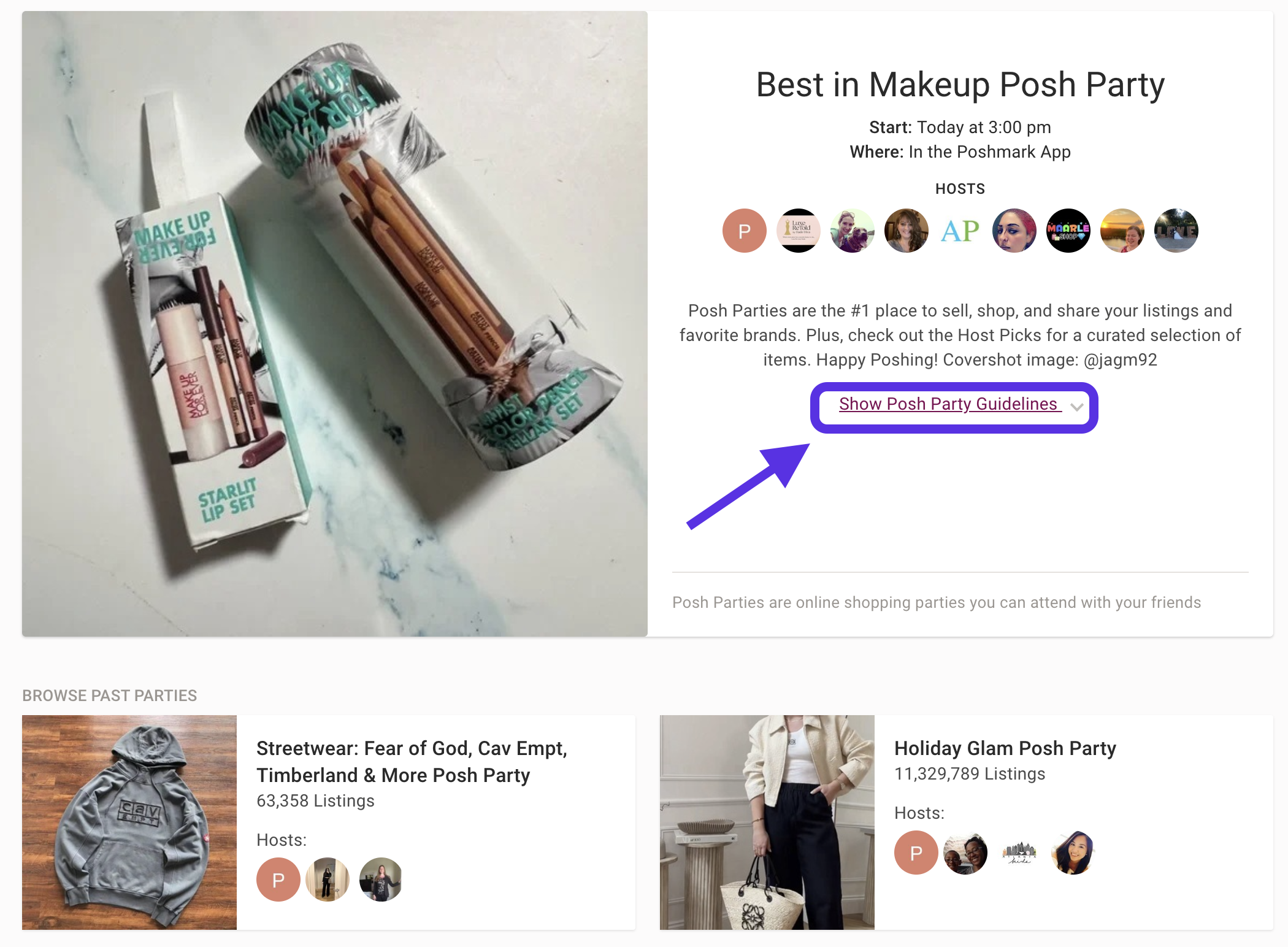
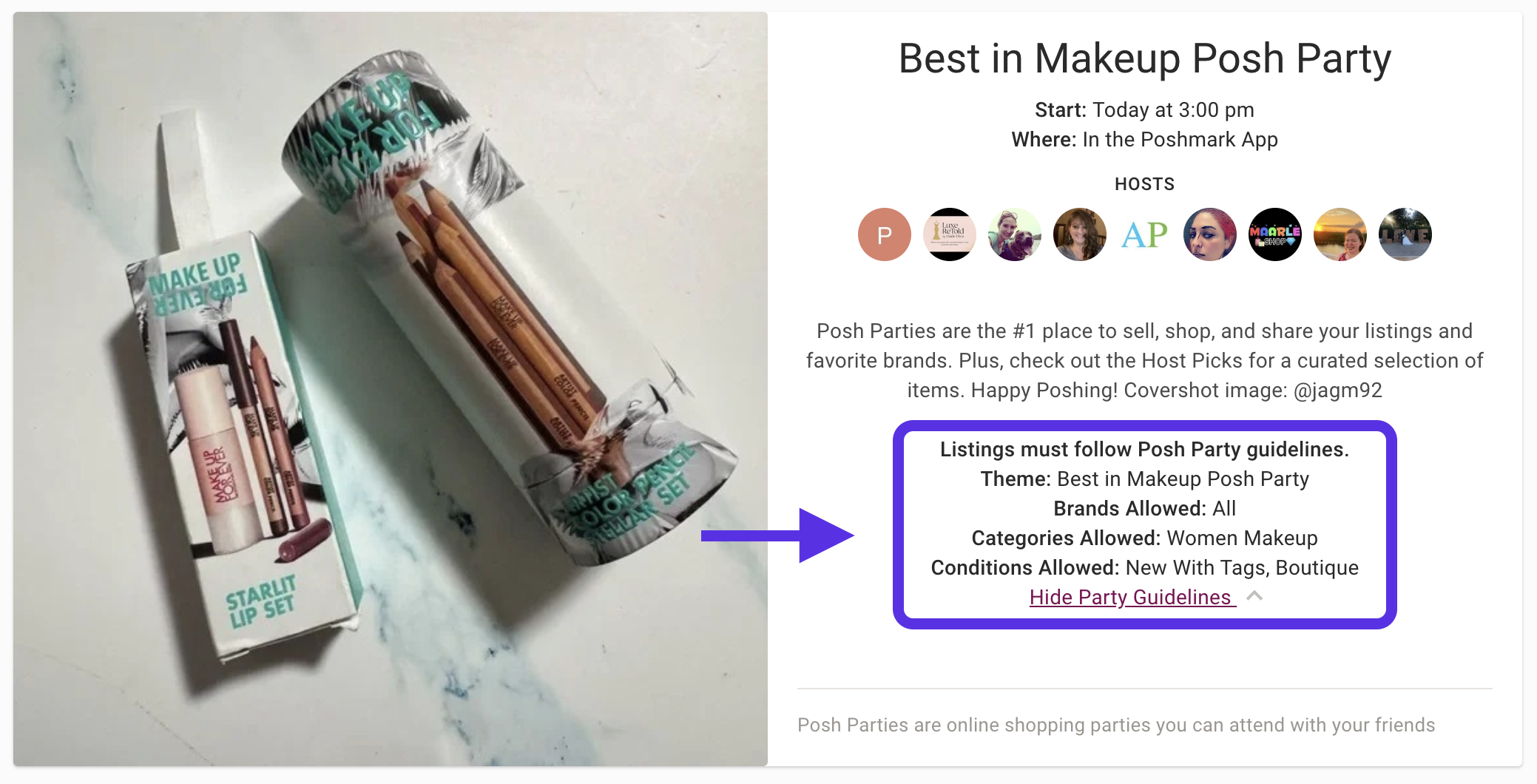
How to Share Listings to Poshmark Parties
Sharing to Poshmark parties is simple:
- Open the active Poshmark party
- Tap Share
- Select an eligible listing from your closet
- Confirm the share to the party
Listings must match the party’s theme to be eligible. Items that don’t qualify won’t appear in the party feed.
Best Practices for Using Poshmark Parties
To get the most out of Poshmark parties:
- Share at the beginning and throughout the party
- Focus on popular brands and trending categories
- Make sure listings have clear photos and accurate titles
- Combine party sharing with regular closet sharing
Consistency matters more than sharing every single party.
Do Poshmark Parties Help You Make Sales?
Poshmark parties increase visibility, not instant sales. They work best when combined with:
- Frequent closet sharing
- Competitive pricing
- Active engagement with other users
Many sellers notice indirect benefits such as more followers and increased engagement that later turn into sales.
Using Automation for Poshmark Parties
Manually sharing to multiple Poshmark parties every day can be time-consuming. This is where automation tools like Closet Assistant come in.
Closet Assistant allows sellers to:
- Automatically share eligible listings to Poshmark parties
- Maintain consistent activity without constant manual effort
- Focus on sourcing, listing, and customer service instead of repetitive sharing
Automation helps sellers stay active during every party without being glued to their phone.
Poshmark Party – Host Picks
Each party is run by Poshmark hosts which are sellers who are in good standing and Poshmark Ambassadors. Poshmark party c0- host who manages the party are responsible for the following in a party.
- Share at least 50 listings with only 5 to 10 of them from your own closet.
- Show new Poshers some love by sharing at least 10 to 25 listings from new closets.
- Only share items that are available for purchase—host picks showrooms are intended to be a highly curated place for shoppers to discover great listings.
- Do not share counterfeit items under any circumstances.
- Do not share listings from closets that participate in offline transactions or communication.
- For makeup-related parties, share makeup that is only NWT.
- Have fun and do a little shopping for yourself while you’re at it!
When host share listings they are sharing the best of the party these are “HOST PICK’s” The host picks are highlighted in the party. Learn more on becoming a Poshmark Ambassador
How to get Poshmark Host Pick
Earning a Poshmark Host Pick can significantly increase visibility and drive traffic to your closet. One effective strategy is reaching out to the party host before the party begins and politely requesting consideration.
How to Ask for a Host Pick
There are two appropriate ways to request a host pick:
1. Comment on the Host’s About Page
Visit the party host’s profile and leave a short, professional comment on their About listing. This introduces you and puts your request on their radar without being intrusive.
Example message:
(@Host Name) Congratulations on hosting the [Party Name] party! I’d love for you to consider an item from my closet as a host pick.
2. Tag the Host on a Specific Listing
Choose one listing from your closet that best fits the party theme. On that listing, tag the party host and politely ask for consideration.
Example message:
(@Host Name) Congratulations on hosting the [Party Name] party! I’d love for you to consider this listing as a host pick.
Best Practices When Requesting a Host Pick
Having hosted many Poshmark parties ourselves, we’ve seen hundreds of host pick requests for every party. The requests that stand out follow a few simple rules:
Keep your message short and respectful
Avoid excessive emojis or overly enthusiastic language
Don’t beg or send multiple messages
Choose your best, on-theme listing
A simple, polite note goes much further than a long or flashy message.
Does Hosting or Getting a Host Pick Help Sales?
Yes. Hosting Poshmark parties — and receiving host picks — can bring a noticeable increase in traffic, followers, and sales. Each time we host a party, we consistently see a bump in sales both before and after the event.
If your goal is to host a party yourself, be patient. It can take six months to a year to be approved. Submitting two to three hosting requests per month is a reasonable and effective approach.
How to Become a Poshmark Party Host
Once you’ve become a Poshmark Ambassador and your account is in good standing, you can apply to host a Poshmark party using the links below.
After submitting the application, approval is not immediate. It may take six months or longer before you receive an invitation from Poshmark to host a party.
When Poshmark sends the invitation email, you’ll have 72 hours to accept the request. If you miss this window, the opportunity may be given to another host.
Apply to Host a Poshmark Party
-
United States Party Host Form – CLICK HERE
-
Canada Party Host Form – CLICK HERE
Common Mistakes Sellers Make with Poshmark Parties
Avoid these common mistakes:
- Only sharing to parties and ignoring closet sharing
- Sharing non-eligible items
- Expecting instant sales from every party
- Over-sharing aggressively in short time windows
A balanced approach always performs better.
Are Poshmark Parties Worth Your Time?
Yes — when used correctly. Poshmark parties are best viewed as a visibility tool rather than a direct sales machine. Sellers who combine party sharing with consistent closet activity see the strongest long-term results.
If your goal is growth without burnout, tools like Closet Assistant can help you stay competitive while saving valuable time.
Ready to maximize Poshmark parties without constant clicking?
Closet Assistant helps you stay active, visible, and focused on growing your business.
Closet Assistant is designed to keep your closet active — exactly the way the algorithm prefers — without you spending hours manually sharing.
With features like:
 Automatic closet sharing Party sharing Return sharing Offer automation Daily share scheduling iOS app + Chrome extension support
Closet Assistant makes sure your listings stay fresh, visible, and boosted in the algorithm 24/7.
You focus on the SEO part — titles, descriptions, photos, pricing — and Closet Assistant handles the share activity that keeps the algorithm happy.
You create the optimized listings.
Closet Assistant keeps them alive in search.
This is the winning strategy
Download Closet Assistant and experience the power of automation today.
 iOS App: Available on the Apple App Store Chrome Extension: Perfect for Mac & Windows users
Frequently Asked Questions About Poshmark Parties
What are Poshmark parties?
Poshmark parties are scheduled shopping events inside the Poshmark app where sellers share eligible listings to a themed party feed for increased visibility.
Do Poshmark parties help you make sales?
Poshmark parties increase exposure, which can lead to more likes, shares, followers, and eventually sales. They work best when combined with regular closet sharing.
How often do Poshmark parties happen?
Poshmark hosts multiple parties every day, including category-specific, brand-focused, and an all-categories Posh Party each night.
What items can be shared to Poshmark parties?
Only listings that match the party’s theme or brand are eligible. Items outside the theme cannot be shared to that party.
When is the best time to share to Poshmark parties?
The best times are right when the party starts and periodically throughout the event, especially during peak evening hours.
Can you share the same item to multiple Poshmark parties?
Yes. If an item qualifies for more than one party, it can be shared to multiple Poshmark parties throughout the day.
How many times should I share to a Poshmark party?
Most sellers benefit from sharing each eligible item once per party. Over-sharing the same listing too frequently can reduce effectiveness.
Do Poshmark parties replace closet sharing?
No. Poshmark parties should supplement — not replace — regular closet sharing. Closet sharing remains one of the strongest visibility signals.
Are Poshmark parties worth the time?
Yes, when used strategically. Poshmark parties are best for visibility and follower growth rather than instant sales.
Can I automate sharing to Poshmark parties?
Yes. Automation tools like Closet Assistant allow sellers to automatically share eligible listings to Poshmark parties, saving time and maintaining consistency.
Why do some sellers skip Poshmark parties?
Some sellers skip parties due to time constraints or low immediate sales. Automation helps sellers participate without manual effort.
Do Poshmark parties help new sellers?
Yes. New sellers often gain early exposure, followers, and engagement by consistently sharing to Poshmark parties.
Follow Us On:




Welcome to our blog!
Hello! We are Meghan and Ryan; we have been resellers for over 25 years. Our tips guarantee you will learn from our experience as sellers. We share our knowledge of building a full-time business throughout our blog post.
In 2019, we started Closet Assistant, which offers a series of automated tools for Poshmark sellers and resellers. The main components of Closet Assistant are its auto-sharer Poshmark Bot and Cross lister. The Poshmark share bot will share your closet and other Poshmark users’ closets with a single click. With our Poshmark bot, you will no longer need to spend countless hours a day sharing your closet. Spend more time where it counts in your Poshmark business! Unlike other services, Closet Assistant is run by a husband and wife team who are actually resellers on Poshmark. Try our auto closet sharer today for a free 7-day trial!

Recent Comments