
Poshmark Bulk Share: The Fastest Way to Grow Sales in 2026
If you sell on Poshmark, one thing is certain: sharing your closet is essential. Listings that are shared more often gain higher visibility, more likes, and more sales. That’s why poshmark bulk share has become one of the most effective strategies for sellers looking to grow consistently.
In this guide, you’ll learn:
-
What poshmark bulk share means
-
Why manual sharing holds sellers back
-
How bulk sharing boosts visibility and sales
-
Why Closet Assistant is the best bulk sharing solution
What Is Poshmark Bulk Share?
Poshmark bulk share refers to sharing multiple listings — or your entire closet — automatically or semi-automatically instead of sharing items one by one.
When you bulk share:
-
Your listings move to the top of search results
-
Your items gain more visibility
-
You increase likes, offers, and sales
-
You stay competitive with active sellers
The Poshmark algorithm still favors recently shared listings, making bulk sharing one of the most effective growth strategies.
Where To Find The Poshmark Bulk Share Features
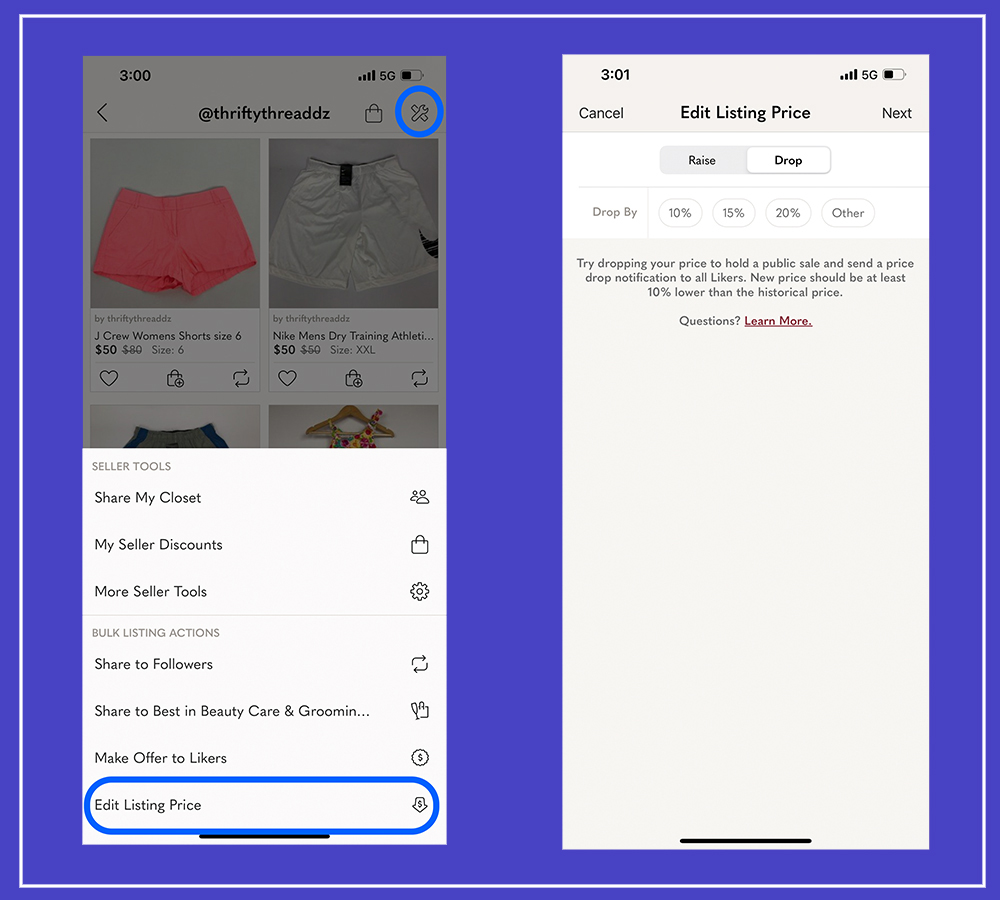
When logged into your Poshmark account, navigate to your Poshmark Closet page. Then look above the sort by filters on the right side just before your closet. Next, you will see a wrench icon. Selecting the wrench will display the new features.
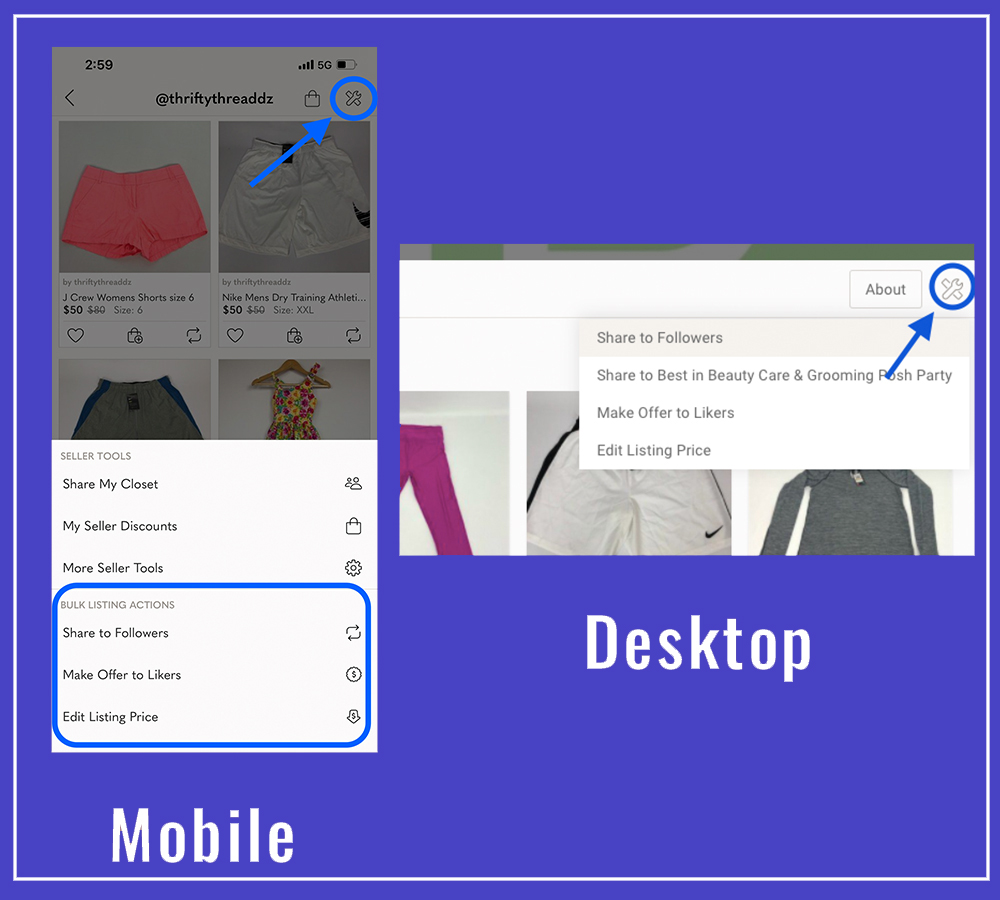
Bulk Sharing To Followers
To use the Poshmark bulk share feature,
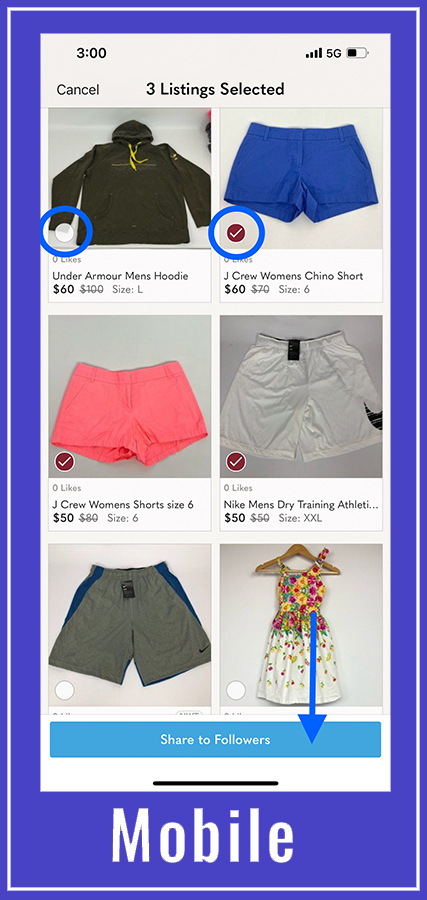
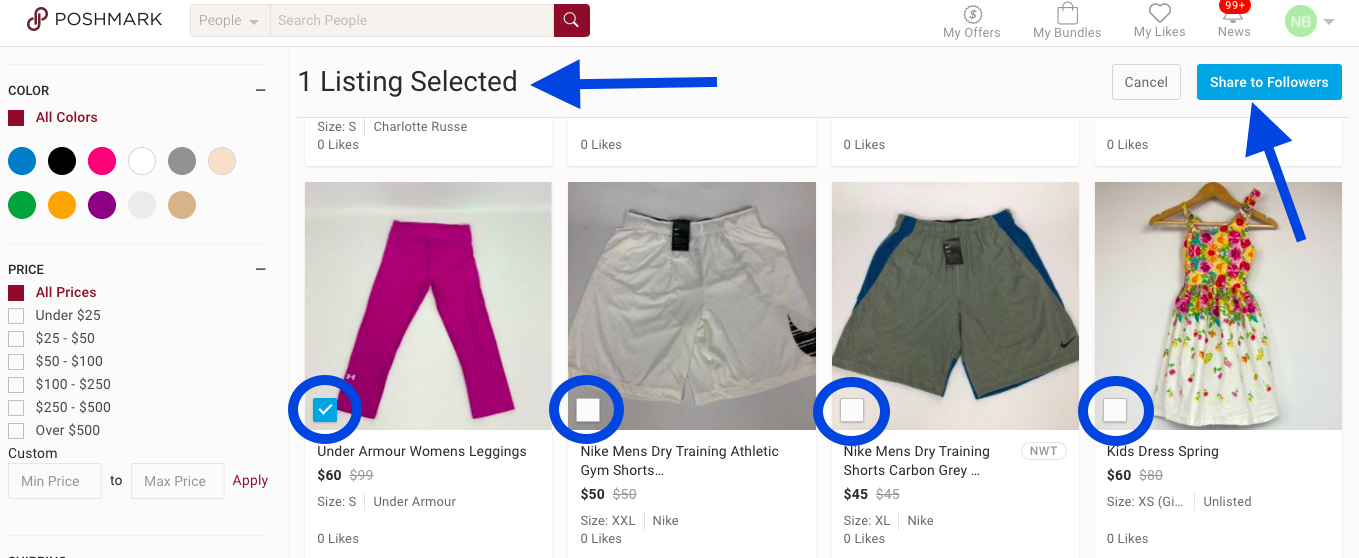
• Select the share to followers option; this will allow you to bulk share all of your Poshmark listings.
• Next, you will see each listing with a white box in the bottom right corner.
• Select each listing. Once you have selected all of the listings you would like to share.
• Select the “Share to Follower” blue button.
I know what you’re you’re thinking. Yes this still takes time to share! Thats why we created the Closet Assistant. You can share your entire closet automatically and schedule when you want your closet shared each day.
Bulk Sharing To Parties
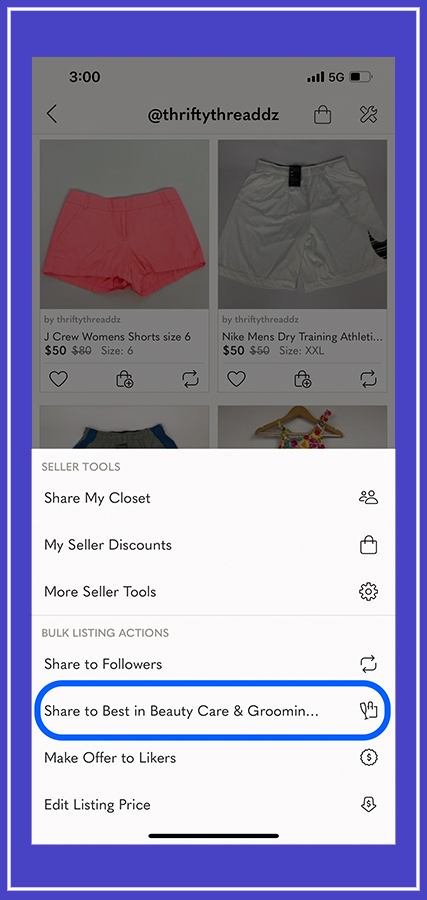
You will only see the Poshmark bulk share option when a party is underway.
When a party has started, look for the share to party option after selecting the wrench. Once opened, you can then select each listing to share to the party. Only listings that fit the party’s guidelines will display. The Closet Assistant can also share all of your listings to a party with one click!
Poshmark Bulk Offers
While Poshmark’s bulk offers save time compared to individual offers, they still require manual action. Many sellers pair bulk offers with automation tools like Closet Assistant to handle sharing and engagement, allowing them to focus on pricing and conversions.
- first select the wrench.
- Then select the “Make Offer to Likers” option.
- select the discounted percentage you would like to apply to your listings along with the shipping discount.
Closet Assistant’s bulk offer feature can send offers automatically. Closet Assistant also has the ability to send an offer as soon as a potential buyer likes the item.
Why Manual Sharing Isn’t Scalable
Manually sharing your closet works for very small closets, but it quickly becomes impractical as you grow.
Problems with manual sharing:
-
Extremely time-consuming
-
Difficult to do consistently every day
-
Leads to burnout
-
Limits how large your closet can grow
For sellers with dozens—or hundreds—of listings, manual sharing is simply not efficient.
Poshmark’s Built-In Bulk Share Option
Poshmark does offer a bulk share option that allows sellers to select multiple listings and share them at the same time.
This feature is helpful, especially for:
-
Small closets
-
Occasional sharing
-
Sellers who don’t mind manual work
However, the built-in bulk share still requires:
-
Manually selecting listings
-
Repeating the process multiple times per day
-
Staying logged in and active
-
Constant attention
For growing closets, this quickly becomes inefficient.
Why Poshmark’s Bulk Share Isn’t Efficient at Scale
As your closet grows, Poshmark’s native bulk share shows its limits.
Common limitations:
-
No true “share entire closet” automation
-
Requires manual interaction every session
-
Can’t run in the background
-
Not practical for frequent sharing schedules
Sellers with dozens or hundreds of listings still spend significant time sharing.
How Poshmark Bulk Share Increases Sales
Whether you use Poshmark’s built-in option or an external tool, bulk sharing:
-
Pushes listings higher in search
-
Reintroduces items to potential buyers
-
Increases engagement across your closet
The difference is consistency — and consistency is where automation wins.
Why Closet Assistant Is Better Than Native Bulk Share
Closet Assistant is ideal for sellers who:
-
Share multiple times per day
-
Have large or growing closets
-
Want hands-off automation
-
Prefer consistent activity without burnout
Native bulk share works — but automation works better.
Closet Assistant is designed to keep your closet active — exactly the way the algorithm prefers — without you spending hours manually sharing.
With features like:
 Automatic closet sharing Party sharing Return sharing Offer automation Daily share scheduling iOS app + Chrome extension support
Closet Assistant makes sure your listings stay fresh, visible, and boosted in the algorithm 24/7.
You focus on the Sourcing, Listing and Shipping— and Closet Assistant handles the share activity that keeps the algorithm happy.
You create the optimized listings.
Closet Assistant keeps them alive in search.
This is the winning strategy for 2025.
Download Closet Assistant and experience the power of automation today.
 iOS App: Available on the Apple App Store Chrome Extension: Perfect for Mac & Windows users
Final Thoughts on Poshmark Bulk Share
Poshmark’s bulk share option is a helpful feature, but it still requires time and effort. As closets grow, efficiency becomes the deciding factor.
Poshmark bulk share is most powerful when it’s consistent, scalable, and automated.
Closet Assistant provides a smarter way to bulk share — helping sellers stay visible, save time, and grow sales more efficiently.
Frequently Asked Questions About Poshmark Bulk Share
What is Poshmark bulk share?
Poshmark bulk share allows sellers to share multiple listings at once instead of sharing items individually. Sharing keeps listings visible and helps them appear higher in search results.
Does Poshmark have a bulk share feature?
Yes. Poshmark offers a built-in bulk share option that lets sellers select multiple listings and share them together. However, it still requires manual selection and cannot be automated.
Is Poshmark bulk share effective?
Yes. Bulk sharing improves listing visibility, increases engagement, and can lead to more likes and offers. The biggest factor is consistency—frequent sharing produces better results.
Why isn’t Poshmark’s bulk share efficient for large closets?
Poshmark’s native bulk share requires sellers to stay active, manually select listings, and repeat the process multiple times per day. For large or growing closets, this becomes time-consuming and difficult to maintain.
How is Closet Assistant better than Poshmark bulk share?
Closet Assistant automates the bulk sharing process. It can share your entire closet, run on a schedule, and work in the background—saving time while maintaining consistent visibility.
Is it safe to use automation for Poshmark bulk sharing?
When used responsibly, automation tools designed to mimic natural behavior are commonly used by sellers. Closet Assistant focuses on controlled sharing speeds and platform-friendly activity.
How often should I bulk share my Poshmark closet?
Many sellers bulk share their closets multiple times per day to stay competitive. The ideal frequency depends on closet size, inventory turnover, and selling goals.
Do more shares actually lead to more sales?
Yes. More shares increase visibility, which leads to more likes, offers, and potential buyers seeing your listings.
Who should use Poshmark bulk share tools?
Bulk share tools are best for sellers with growing closets, limited time, or anyone who wants consistent activity without manually sharing every listing.
Follow Us On:




Welcome to our blog!
Hello! We are Meghan and Ryan; we have been resellers for over 25 years. Our tips guarantee you will learn from our experience as sellers. We share our knowledge of building a full-time business throughout our blog post.
In 2019, we started Closet Assistant, which offers a series of automated tools for Poshmark sellers and resellers. The main components of Closet Assistant are its auto-sharer Poshmark Bot and Cross lister. The Poshmark share bot will share your closet and other Poshmark users’ closets with a single click. With our Poshmark bot, you will no longer need to spend countless hours a day sharing your closet. Spend more time where it counts in your Poshmark business! Unlike other services, Closet Assistant is run by a husband and wife team who are actually resellers on Poshmark. Try our auto closet sharer today for a free 7-day trial!

Recent Comments